What Can Internet Provider See About You Online?
Every time you open your internet browser, your internet provider is right there with you, watching. They’re not just moving your data; they’re also keeping an eye on what you’re doing. Think of it like a mail carrier who does not just deliver letters but also reads who sent them, where they’re going, when they were sent, and keeps track of everything. That’s pretty much what your internet provider does.
They don’t just send your data; they see it, record it, and send it where it needs to go. They also keep some of it.
So, it’s not really a question of if your internet provider can see what you’re doing. They can. The real question is, just how much can they see?
Understanding what your internet provider can see is the first step; to take control of your online privacy and block unwanted ads, consider exploring the Best DNS Providers for Privacy and Ad Blocking (Top 5 Powerful Picks).
Table of Contents
How ISPs Track Your Activity
Let’s talk about the basics first: how the internet works. When you type in a web address, watch a video, get a file, or back up your stuff to the cloud, all that info goes through your internet provider’s stuff. I mean, it really goes through their equipment.
Every bit of data goes through stuff they own and take care of.
They can see the addresses of all the places you go on the web. This is kind of like someone writing down every building you go into all day. Check out a dating site late at night? They know. Spend hours looking up health stuff? They see that too. Reading up on investments or politics? Yep, they got that.
But, it’s not quite that simple. A lot of the web uses encryption (HTTPS). This keeps the actual stuff you’re doing hidden. Your internet provider might know you went to YouTube, but they don’t know what you watched. They can see you went to, say, Amazon, but they can’t see what’s in your shopping cart.
Imagine walking around a big mall with cameras watching. They see you come and go, but not what you bought.
Still, that’s only part of the story.
DNS: A Weak Spot
Here’s a place where they can see a lot more.
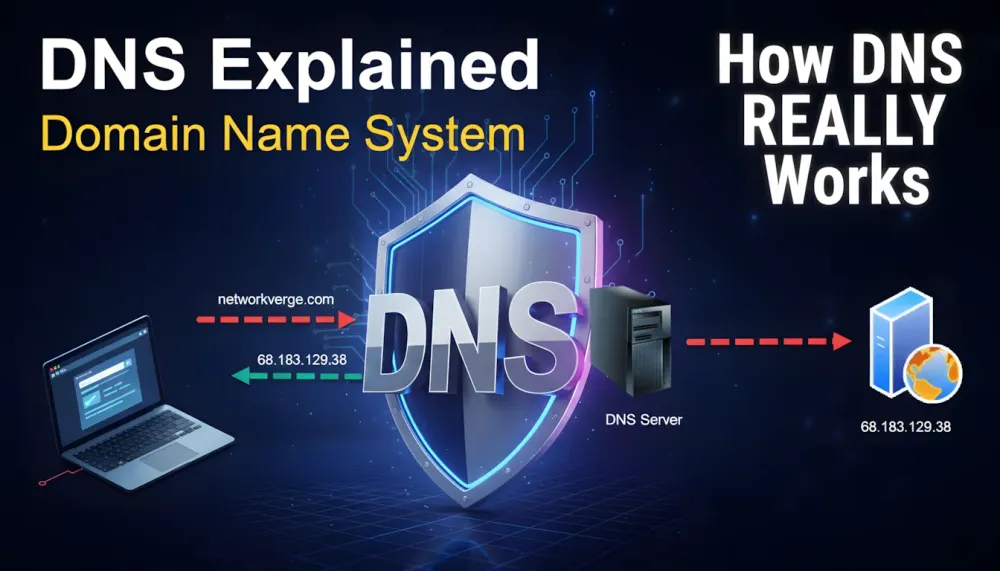
DNS (Domain Name System) turns easy-to-read web addresses (like example.com) into the number addresses that computers use. Most people just use their internet provider’s DNS servers. And that makes a big change.
DNS requests often aren’t protected. Before your protected session even starts, your computer has to ask, Where is this website? That question, by itself, tells a lot.
Even if a site uses HTTPS, the DNS lookup before that usually doesn’t.
So, your internet provider sees a map of where you’re going before you get there.
Say you start looking at info about a political group. Or you read forums about feelings. Or you look up a weird illness. The DNS request shows what you’re interested in right away. They can see patterns and get a good idea of what you like and who you are.
DNS doesn’t show what you’re doing inside the building, but it shows every door you knock on.
Torrent Tracking and File Sharing
If you use things like BitTorrent to share files, they can see even more.
Your internet provider can pretty easily tell when you’re using torrents. On top of that, the way the data moves, the size of the files, and other details can give them hints about what you’re downloading.
In some places, internet providers are legally required to keep records. In Russia and a few other countries, they have to keep details about connections, sites visited, and when you were online for months.
Think of a huge record of everything you’ve done online for the last six months. That exists.
People who own copyrights often send complaints about people sharing files illegally. These complaints include the internet addresses used for the sharing. Those addresses are linked to people’s accounts. Some internet providers send warnings. Others slow down your internet. Some take it further.
The web remembers.
Deep Packet Inspection (DPI)
Here’s something that’s more detailed, a bit more like surgery, and even more intrusive.
DPI (Deep Packet Inspection) is like taking an X-ray of your internet data. Instead of just looking at the basic info, it looks inside the data to see what kind of content it is, what protocols are being used, and what the app is doing.
In Russia, DPI is used to block things that the government doesn’t want people to see. But, it could also be used to see other things: if you’re using a VPN, what messaging apps you use, if you’re using VoIP, and what games and streaming services you’re using.
If the data isn’t protected, DPI can see what’s in it. If it is protected, they can still guess based on the basic info and how the data is being sent.
Basically, it’s guessing what you’re doing based on how you act online.
Money Matters: Data is Valuable
Let’s be real.
Your data is worth money.
Internet providers might collect general info about what people do online and use it to help them with advertising or sell it to marketing companies. Like, if people in one area often look at car dealerships, that’s something they can use to make money. If a lot of people watch streaming services in the evening, advertisers can adjust their ads.
They say this data is anonymized. But, it can be hard to tell the difference between general data and tracking individuals.
Big phone and internet providers often have analytics departments to make money off this stuff.
The Law
Internet providers don’t do whatever they want. They have agreements with you (that no one reads) that say they can collect and keep certain data. They also have to listen to the police.
At the same time, there are rules to protect your personal data. The balance between keeping the state secure, making money, and protecting your privacy is always changing. It changes with new laws, court decisions, and what’s going on in the world.
It’s complicated. And you probably don’t know as much about it as they do.
How to Hide Your Internet Activity
It’s almost impossible to be completely private online. But you can do some things to make it harder for them to see everything.
One thing you can do is use other DNS resolvers like Cloudflare (1.1.1.1) or Google (8.8.8.8). These services mean you don’t have to use your internet provider’s DNS. Even better, turn on DNS over HTTPS (DoH). This protects your DNS requests so they’re hidden inside normal web traffic.
Using protected DNS doesn’t make you hidden. But, it does make it harder for your internet provider to watch you.
Other things you can do are use VPNs, protected messaging apps, and browsers that protect your privacy. Each of these things makes it a bit harder to see what you’re doing. But none of them make you completely invisible.
Staying safe online is about doing a lot of little things.
The Way Things Are
You can’t be completely hidden on the internet today without doing crazy things. Your internet provider will probably know more about you than you’re comfy with.
The important thing is not whether they’re watching. It’s how much they can see and what they’re doing with the info.
Every click, download, and site you visit can be recorded. This isn’t something to be scared about. But it’s something to be aware of.
Understanding how you’re being watched is the first step. Using tools to protect yourself is the second.
Your internet provider could probably write a pretty good book(blog) about your life online – what you look at when no one’s watching, what you’re really into, and what you care about.
So, here’s the question:
Are you okay with them keeping track of everything you do?
Or are you going to take back control of your own story online?
SPONSORED
Your ISP doesn’t need to read your messages to understand your life. All it takes is your DNS history.
Before any encrypted connection even begins, your device asks a simple question: “Where is this website?” If you’re using your provider’s default DNS, they see every one of those questions — every site you look up, every service you connect to, every late-night curiosity.
NextDNS encrypts those requests and stops tracking at the source. It replaces your ISP’s DNS with a private, encrypted resolver that blocks trackers, malicious domains, and intrusive ads before they load. No heavy software. No performance loss. Just quiet control over who gets to see where you go online.
If DNS is the map of your digital life, maybe it’s time you decided who gets to read it.
👉 Try NextDNS for free and take back control of your browsing footprint.
FAQ
1. Can my internet provider see everything I do online?
Not everything. They can see which websites you visit and when, but if a site uses DNS (DoH), they usually can’t see the exact pages you view or what you type.
2. How can I reduce what my internet provider can see?
You can use encrypted DNS (DoH), a VPN, privacy-focused browsers, and secure messaging apps. These tools won’t make you invisible, but they significantly limit tracking.