Introduction
Most software updates come and go without much impact. A few bug fixes, maybe a minor feature, and that’s it. But NVIDIA App 11.0.7 feels different. It’s not just another version bump — it’s a clear signal of where NVIDIA is heading with its ecosystem.
This update quietly pushes the platform further into AI-driven performance, automation, and deeper control over how games actually run.
And once you start looking closer, it’s clear this is more than just a routine release
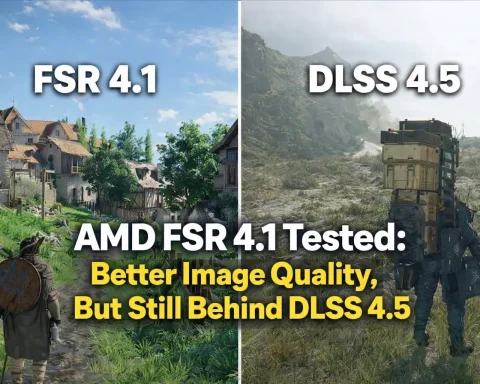
As you look into the latest software updates to boost your game performance, it's also worth exploring how specific technologies like AMD FSR 4.1 are making a difference in image quality and real-world performance, as detailed in AMD FSR 4.1 Tested: Better Image Quality, But Still Behind DLSS 4.5.
Table of Contents
DLSS 4.5 and the Next Step in Frame Generation
The headline feature of NVIDIA App 11.0.7 is the full integration of DLSS 4.5 Multi Frame Generation. But what makes it interesting isn’t just the version number — it’s what NVIDIA is enabling behind the scenes.
With the introduction of advanced presets like MFG x5 and x6, the system can now generate multiple intermediate frames between real ones. In simple terms, your GPU is no longer just rendering frames — it’s predicting and constructing them.
This feature is currently available for GeForce RTX 50 series GPUs, which makes sense given the computational demands. However, NVIDIA also introduced a new frame generation model powered by the Transformer Engine, extending compatibility to RTX 40 series cards as well.
That’s an important detail. It suggests NVIDIA is not just pushing forward — it’s trying to scale these AI features across generations.
And it raises an interesting question: at what point does rendering become more about prediction than computation?
Auto Shader Compilation — Reducing Stutter the Smart Way
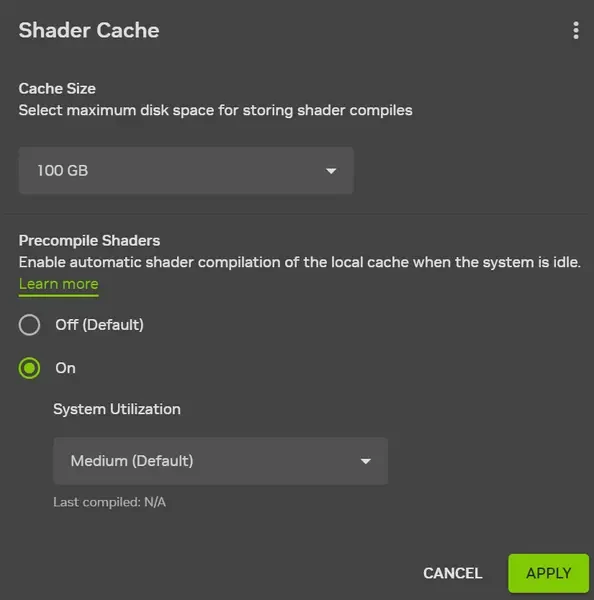
If you’ve ever launched a game after updating drivers and noticed sudden stutters or micro-freezes, you’ve already encountered the problem this feature tries to solve.
NVIDIA Auto Shader Compilation introduces a way to recompile game shaders automatically after driver updates — specifically for DirectX 12 titles. It can run either during system idle time or when triggered manually by the user.
That may sound like a small change, but in practice, it tackles one of the most frustrating aspects of modern gaming: inconsistent performance right after updates.
It’s worth noting that this feature is currently in beta and does not handle initial shader compilation. You still need to launch the game at least once for that. But even in this early stage, it significantly improves the overall experience by smoothing out performance over time.
Expanded Display Controls and Game Optimization
Another addition that might seem minor at first — but is actually quite practical — is the ability to adjust display resolution directly inside the NVIDIA App.
You can now access it through:
System → Displays → Display Properties
For users who frequently tweak their setup or test different configurations, this removes unnecessary friction and centralizes control within one interface.
On top of that, NVIDIA expanded its list of games with optimized settings. The update includes support for:
- Arknights: Endfield
- Ashes of Creation
- Highguard
- StarRupture
- The Last Caretaker
These profiles allow the app to automatically configure graphics settings based on your hardware, saving time and ensuring balanced performance.
DLSS Override and Broader Game Support
The addition of DLSS Override support for 31 games is another quiet but meaningful improvement.
This feature gives users more control over how DLSS behaves in supported titles. Instead of relying entirely on predefined settings, you can fine-tune how the technology is applied — whether you prioritize performance, image quality, or a balance of both.
It’s part of a broader trend: NVIDIA is gradually shifting from rigid presets to more flexible, user-driven control.
And for advanced users, that flexibility can make a real difference.
Bug Fixes, Stability, and UI Improvements
Beyond the headline features, NVIDIA also addressed a range of issues that affected usability and stability in previous versions.
Among the fixes:
- Resolved overlay bugs causing incorrect monitoring data and flickering
- Fixed missing “NVIDIA Smooth Motion” setting in global options
- Corrected resolution changes not applying properly in games
- Eliminated flickering when switching display modes
- Fixed installation issues when the system was offline
Additionally, the NVIDIA G-Assist AI interface received usability improvements, including refined voice command shortcuts and better interaction flow.
Overall, the update improves not just functionality, but also reliability — which often matters just as much.
Final Thoughts: More Than Just an Update
Looking at NVIDIA App 11.0.7 as a whole, it’s hard to see it as just another update.
DLSS is becoming more advanced. Frame generation is becoming more aggressive. And the app itself is evolving into something closer to an intelligent control hub rather than a simple utility.
We’re slowly moving toward a future where performance depends less on raw hardware and more on how effectively software can enhance and extend it.
And NVIDIA seems fully committed to that direction.
The only real question is — how far can this approach go?