

What Is NVMeDisk Windows Driver
Every once in a while, a seemingly technical update quietly reshapes how an entire operating system behaves. Microsoft’s transition to the NVMeDisk driver in Windows feels exactly like that kind of shift — subtle on the surface, but potentially massive in real-world impact.
At its core, this change is about removing inefficiencies that have existed for years. And while it might not grab headlines like flashy UI updates or AI features, the implications for SSD performance are hard to ignore.
While temporary spikes in demand can cause a system to slow down, persistent performance issues might indicate deeper problems, leading many to ask Why Is My VPS Slow? 7 Powerful Reasons & Fixes You Must Know.
Table of Contents
Why Microsoft Is Reworking the Windows Storage Stack
For a long time, Windows handled NVMe SSDs through a somewhat indirect approach. Even though NVMe drives are designed for high-speed, low-latency communication, Windows traditionally routed their commands through a SCSI translation layer.
That extra step didn’t break anything — but it did introduce overhead.
With the introduction of NVMeDisk.sys, Microsoft is moving toward a more native interaction model. Instead of translating NVMe commands into SCSI, the operating system now communicates directly with NVMe drives. It’s a cleaner, more efficient path — and one that aligns better with how modern storage is meant to work.
This shift was implemented into the Windows storage stack toward the end of 2025, signaling a broader effort to modernize how Windows handles high-performance storage devices.
What Changes With NVMeDisk.sys
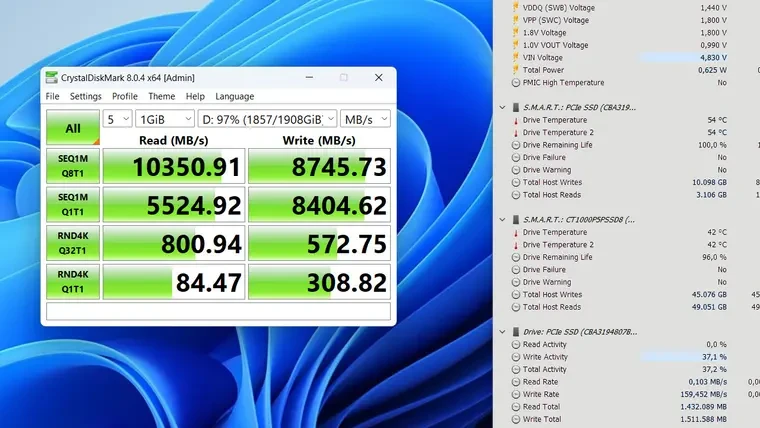
The biggest difference isn’t something you’ll see — it’s something you’ll feel.
By eliminating the SCSI translation layer, NVMeDisk.sys reduces the number of steps required for data to move between the system and the SSD. That translates directly into lower latency and better responsiveness, especially in workloads that depend on fast, random access.
In practical terms, this means:
- Faster access to small files
- Improved responsiveness in demanding applications
- More efficient use of modern NVMe hardware
It’s less about peak speeds and more about how consistently the system performs under pressure.
Real Performance Gains: What the Tests Show
The most compelling evidence comes from benchmarking. According to Storage Review testing, the improvements aren’t theoretical — they’re measurable and, in some cases, dramatic.
Testing was conducted on a high-end server configuration with:
- Dual AMD EPYC 9754 processors (256 cores total)
- 768 GB DDR5 memory at 4800 MT/s
- Windows Server 2025 build 26100.32370

The standout result appears in random read operations with 4 KB blocks, which are extremely common in real-world usage.
Here’s what changed:
- Bandwidth and IOPS increased by over 60%
- Latency dropped by nearly 40%
That’s not a marginal improvement — it’s a fundamental leap in how efficiently the system can handle small, frequent data requests.
When moving to larger random reads (64 KB), the gains are still present but less dramatic:
- Performance improved by just over 20%
- Latency decreased by around 13%
The pattern is clear: the smaller and more random the workload, the more NVMeDisk shines.
The Trade-Offs: Where Improvements Are Smaller
Interestingly, not every scenario benefits equally.
For sequential reads, the raw performance remains largely unchanged. However, something subtle — and arguably just as important — improves: CPU efficiency.
Even when speeds stay the same, CPU usage drops by nearly 20%, meaning the system achieves the same throughput with less processing overhead.
The same applies to write operations:
- No major increase in speed
- Noticeable reduction in CPU load
This suggests that NVMeDisk isn’t just about making things faster — it’s about making them more efficient overall. And in environments where resources are shared across many tasks, that matters.
Should You Enable It Now?
Technically, yes — but practically, it’s not that simple.
Right now, enabling the NVMeDisk driver requires manual changes to the Windows registry. That alone introduces risk, especially since the feature isn’t fully finalized for general users.
There’s also the possibility of instability, which makes it a questionable choice for everyday systems or production environments.
In other words, this is still early-access territory. It’s there for testing and experimentation — not for widespread adoption just yet.
What This Means for the Future of Windows Storage
What makes NVMeDisk important isn’t just the performance gains we’re seeing today. It’s the direction it points toward.
Microsoft is clearly moving toward:
- A more native, hardware-aligned storage architecture
- Reduced abstraction layers
- Better efficiency across modern SSD workloads
And eventually, this new NVMe stack is expected to become the default behavior in Windows.
When that happens, users won’t need to tweak anything. The benefits — faster random access, lower latency, reduced CPU load — will simply be part of the experience.
The conclusion
It’s a bit ironic that while everyone focuses on flashy features in tech, some of the most important updates in Windows happen quietly beneath the surface, deep in the storage system where speed and design come together. If the initial results are any indication, NVMeDisk could become one of the most significant behind-the-scenes improvements Windows has introduced in quite some time.

