VPN Anonymity Illusion: Why You’re Still Visible Online
VPNs solve a straightforward problem: they hide your real IP address and route your traffic through a different exit point. For most people, the result feels almost magical. Your visible location shifts to another country, the VPN icon turns green, and pages load normally. It’s easy to believe no one is watching anymore.
The reality is different. Today’s platforms—banks, marketplaces, ad networks, anti-bot systems, and even your ISP—stopped relying on IP alone years ago. That address is now just the first filter. Next come the owner of the IP range, the reputation of that specific node, the pattern of the first packets, TLS parameters, presence or absence of QUIC, your browser’s digital fingerprint, login history, time zone, interface language, and account behavior. One odd signal might be dismissed as coincidence. Several signals together create a confident picture.
That’s why you can see a “foreign” country on your screen while the service still treats your connection with suspicion. A bank demands extra verification. A navigation app acts strangely. A payment form adds an unnecessary confirmation step. A big platform quietly raises your risk score. A VPN doesn’t make traffic invisible. It simply swaps one set of identifying traits for another.
Table of Contents
Layer 1: IP, ASN, and Address Reputation
The crudest and most common check starts with the IP address itself. Most VPN services route traffic through data-center servers. Those addresses belong to someone, and that someone has an entry in the Autonomous System Number (ASN) registry. When the IP belongs to Hetzner, OVH, DigitalOcean, or another cloud provider, anti-fraud systems immediately flag it. To the service, it doesn’t look like a home connection—it looks like a server node.
This is why ASN-based blocking remains so effective. It’s simple, cheap, and works well against mass-market VPNs. The provider doesn’t need to inspect TLS or build behavioral models. It just needs to recognize that the request came from a server network known to host anonymizers. One ASN alone isn’t enough, though. Data centers also host corporate gateways, remote desktops, office tunnels, backup systems, and small-business infrastructure. Serious platforms therefore ask a second question: how clean is this particular IP? Banks and anti-fraud services check reputation databases for fraud activity, automated attacks, proxy networks, and suspicious login patterns. One data-center IP might slip through; another triggers extra checks even for the same actions.
Layer 2: Protocols That Reveal Themselves by Handshake
Encryption doesn’t make traffic shapeless. Providers and large platforms can’t see inside the tunnel, but they can see packet sizes, timing intervals, traffic direction, and the initial handshake. Every VPN protocol has its own signature. OpenVPN, WireGuard, Shadowsocks, Tor, and various obfuscation schemes all behave differently in the first few milliseconds.
Classic OpenVPN and WireGuard are still the easiest to spot. OpenVPN has well-documented packet patterns and exchange sequences. WireGuard is cleaner but still leaves a characteristic key-exchange footprint over UDP. Research from the University of Michigan and later USENIX work showed that a two-stage system—passive selection of suspicious traffic followed by active probing—reliably identifies a large share of even “obfuscated” setups.
That reality pushed the industry toward newer protocols designed to mimic ordinary web traffic more convincingly. Hysteria 2 builds on QUIC and bets on believable behavior over UDP. TUIC v3 follows the same path. AmneziaWG tweaks headers, adds noise, and tries to blur WireGuard’s traits. These approaches don’t become invisible by default, but they dramatically raise the cost of detection. Filters must look deeper and more carefully instead of grabbing traffic by a crude signature.
Layer 3: Low-Level Clues Like MTU, MSS, TTL, and Stack Fingerprint
Many VPN discussions jump straight to the browser and TLS, but important detection happens at a lower level. Any tunnel adds overhead, so the effective MTU almost always drops below the standard 1,500 bytes. That change ripples into MSS (maximum segment size), fragmentation patterns, and the network stack’s transmission behavior. Border equipment and anti-bot systems treat these shifts as quiet but reliable indicators of a tunnel.
Passive stack fingerprinting adds another layer. A single TTL value rarely proves anything because it changes along the path. But the combination of TTL, TCP window size, MSS, TCP options order, and SYN packet structure paints a clearer picture of the operating system and stack behind the connection. Tools like p0f have demonstrated this for years. When a server-grade Linux node suddenly shows client-side traits from a different environment, suspicion rises fast.
Layer 4: QUIC, HTTP/3, and Modern Traffic Behavior
The internet is shifting to HTTP/3 over QUIC and UDP. For modern browsers this is now routine. Many VPNs struggle here. Some handle QUIC poorly, some deliberately block UDP, and some force a rollback to TCP for predictability. Users may never notice the rollback, but detection systems do.
The absence of QUIC on Chrome alone doesn’t prove VPN use—network policy, intermediate gear, site quirks, or flaky connections can cause it too. But in a larger set of signals, it becomes another red flag. If a modern browser on a supposedly “normal” connection consistently avoids HTTP/3 where others use it, anti-fraud or filtering systems take note. Newer protocols like Hysteria 2 and TUIC embrace QUIC instead of dodging it. They live inside the natural flow of today’s web rather than pretending to be something else. The winning trend is clear: protocols that blend into normal network behavior outperform those that merely try to look like web traffic on the surface.
Layer 5: Browser Leaks and Digital Fingerprints That Expose You
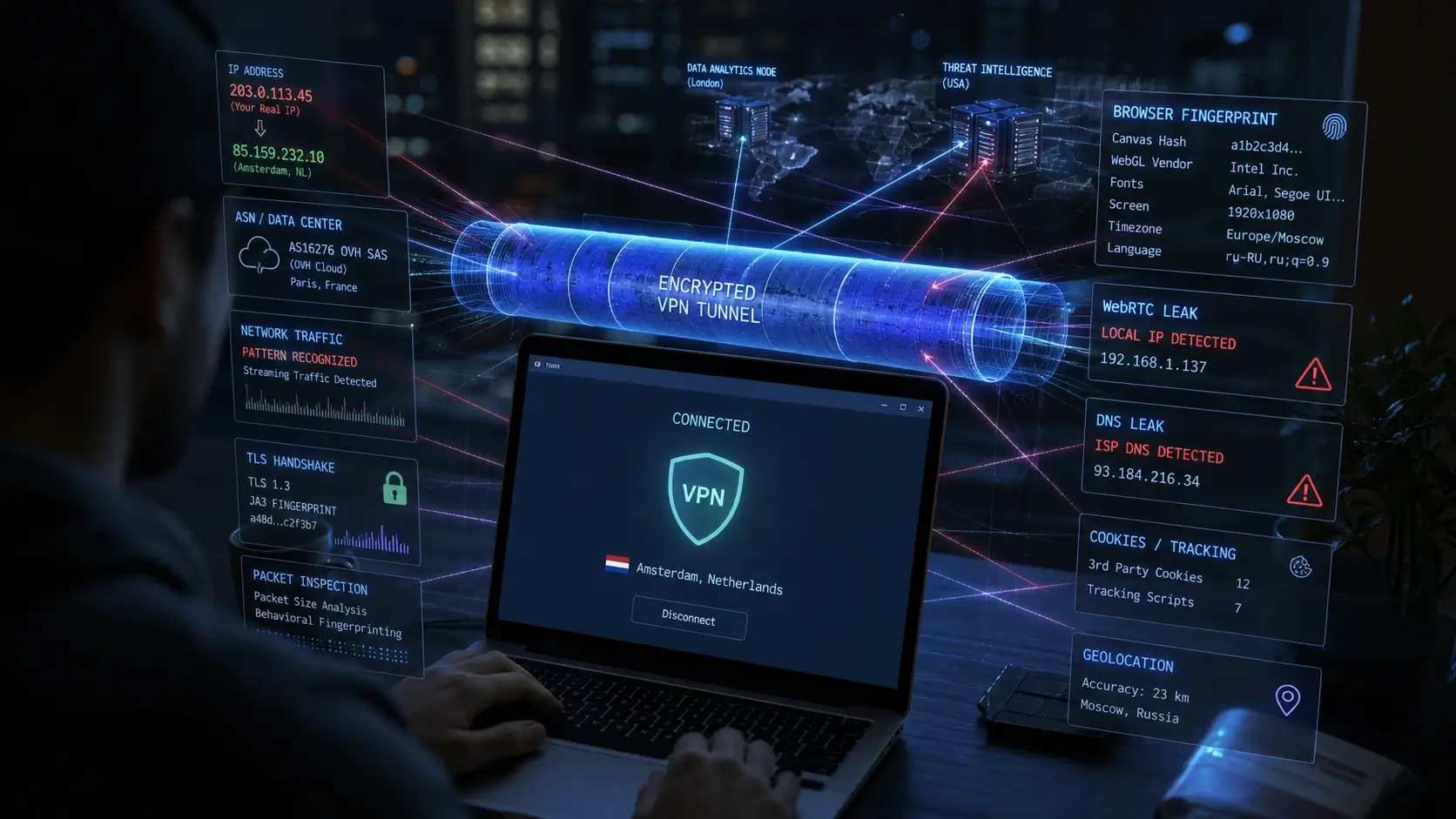
Even a well-masked tunnel can be undermined at the browser level. WebRTC is the most famous culprit. It helps browsers negotiate direct peer connections and, if misconfigured, leaks your real IP to websites. DNS leaks are equally common: if the VPN client or OS isn’t configured carefully, some queries bypass the tunnel and go straight to your ISP, revealing the sites you visit. IPv6 creates another classic hole. Many older VPN setups handle IPv4 cleanly but leave IPv6 traffic un-routed, letting the real home address slip through on dual-stack networks.
TLS adds its own layer. The very first unencrypted packet in an HTTPS handshake—Client Hello—contains protocol versions, cipher suites, extensions, and ALPN. Fingerprinting schemes like JA3 and the more robust JA4 turn that data into a reliable client profile. A VPN changes the route but doesn’t automatically rewrite the browser’s TLS signature or library behavior.
The full browser fingerprint goes even further: screen resolution, installed fonts, interface language, time zone, canvas rendering, WebGL capabilities, audio stack, API behavior, and dozens of other traits. The real giveaway isn’t uniqueness—it’s inconsistency. An IP pointing to Amsterdam paired with Moscow time, Russian locale, Windows-style fonts, and yesterday’s login from a different region creates an obvious mismatch.
Anti-detect browsers help smooth out some contradictions by spoofing time zones, languages, canvas, WebGL, fonts, and other signals to match the exit node. Privacy-focused tools like Mullvad Browser or arkenfox user.js focus instead on reducing the fingerprint’s distinctiveness. Both approaches lower the number of glaring mismatches, but they don’t erase the rest of the picture: network signature, address reputation, device history, and account behavior. Platforms also know that fraudsters love perfectly sterile profiles, so an overly clean fingerprint can itself become suspicious. Plausibility still beats perfection.
Who Relies on These Signals—and Why It Matters
Geoservices, marketplaces, delivery apps, and region-locked media don’t need sophisticated detection. They simply want to verify that the request’s apparent location matches reality so they can show the right prices, catalog, features, or payment rules. ASN data, geo-databases, and a couple of extra signals are usually enough.
Banks and anti-fraud teams operate more cautiously. They assess fraud risk rather than banning VPNs outright. They weigh address cleanliness, device history, fingerprint plausibility, time-zone consistency, mouse movements, typing speed, and error patterns. Many sessions aren’t blocked—they just get extra verification.
ISPs and government filters sit at the network level with DPI tools. They analyze traffic rhythm, packet sizes, destination addresses, and responses to active probes without reading encrypted payloads. The challenge is avoiding collateral damage to legitimate traffic.
Residential and Mobile Proxies Raise the Bar, But Don’t End the Game
Residential and mobile proxies look far cleaner because traffic exits through real home or cellular connections. The ASN belongs to a regular ISP, the geography matches, and the IP doesn’t scream “anonymizer.” Crude filters struggle here, which is why ASN blocking alone is no longer enough. Serious systems shift focus to behavior: how quickly IPs rotate within one account, whether movements between regions make sense, and whether browser and device traits stay consistent across IP changes.
If you want to go even deeper into the network layer, it’s worth understanding how providers themselves analyze traffic. A detailed breakdown of this process is covered in How ISPs Detect VPN Usage: Deep Technical Breakdown, where packet behavior, DPI, and traffic fingerprinting are examined from the provider’s perspective.
The Endless Arms Race Between Anonymity Tools and Detection Systems
The VPN market and detection systems have been locked in a constant arms race. One side blocks classic OpenVPN and WireGuard; the other moves to QUIC, Reality, and better masquerading. One side builds TLS and browser fingerprints; the other levels the environment with anti-detect tools. One side updates IP reputation databases; the other buys fresh ranges or shifts to residential networks.
The next evolution leans on statistical flow analysis and machine learning. Models examine packet-size distributions, timing intervals, connection stability, and dozens of indirect metrics—none of which require reading encrypted content.
The sober takeaway is simple. A VPN doesn’t make you invisible or turn the internet into white noise. It changes the role you play on the network and the signals you emit. How noticeable that change becomes depends on the quality of masking, address cleanliness, browser consistency, and how deeply the observer cares. True invisibility remains an illusion.