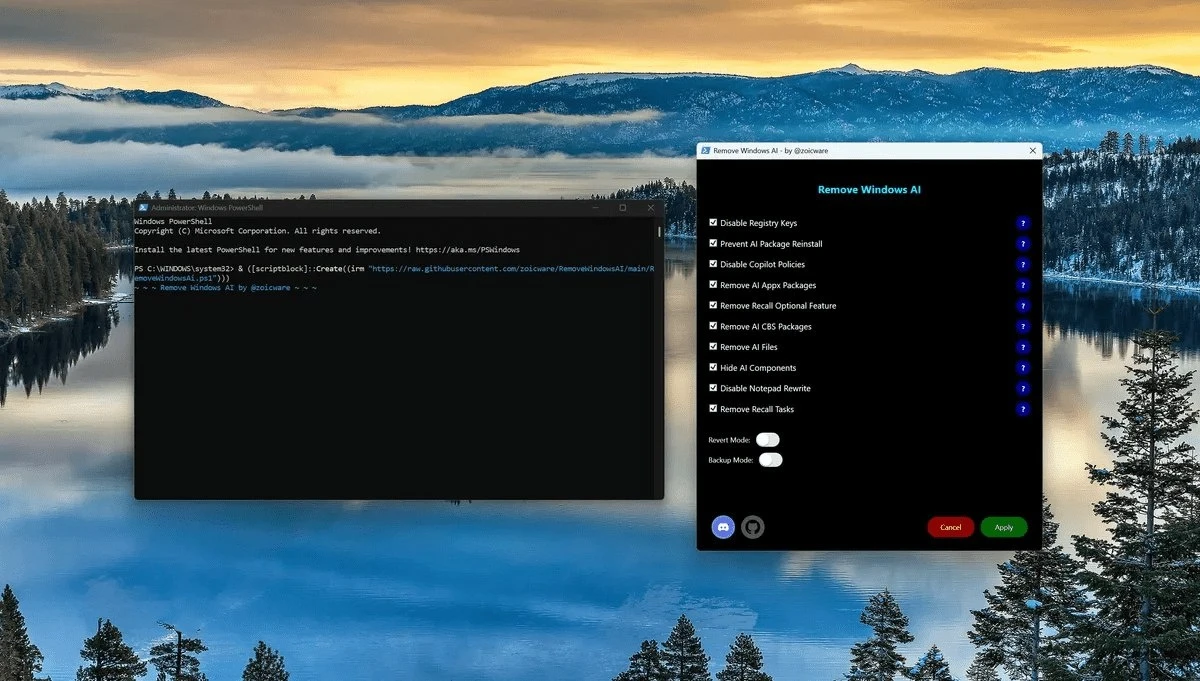
An independent developer has released a script on GitHub that allows users to disable artificial intelligence features in Windows 11, including those not available in certain regions. The tool, called RemoveMicrosoftAI, was highlighted by tech publication Tom’s Hardware, drawing attention to growing user interest in controlling built-in AI functionality.
What the Script Does
The script, published by a GitHub user known as Zoicware, provides a centralized way to manage and disable various AI-driven features embedded in Windows 11. These include both visible tools and background services that may not be easily accessible through standard system settings.
After running the script, users are presented with a menu listing available AI components along with descriptions of how each function operates. From there, users can:
- Disable all AI-related features at once
- Selectively turn off specific tools
- Review functionality before making changes
This approach gives users more granular control over system behavior than default Windows options typically allow.
Focus on Privacy and Performance
According to the developer, the primary goal of the project is to improve:
- User experience
- Privacy
- System security
Some AI features in Windows 11 operate in the background, potentially consuming system resources even when not actively used. By disabling these processes, users may reduce resource usage and limit data processing tied to AI services.
Regional Limitations Highlighted
The script also addresses a lesser-known issue: certain AI features are included in Windows 11 builds but remain unavailable in some regions due to regulatory or rollout restrictions. The tool allows users to disable these dormant components, which might otherwise remain active in the background.
Growing Interest in AI Control
The release of RemoveMicrosoftAI reflects a broader trend among users seeking greater transparency and control over AI integration in operating systems. As Microsoft continues expanding AI capabilities across Windows, interest in tools that manage or limit these features appears to be increasing.
How It Works in Practice
Once executed, the script opens an interface that:
- Lists AI-related components
- Provides brief descriptions of each feature
- Allows toggling individual or all features
The process is designed to be straightforward, even for users without advanced technical knowledge.
Implications for Windows Users
While Microsoft has positioned AI as a core part of Windows’ future, tools like RemoveMicrosoftAI suggest that not all users are ready to fully embrace these changes. Concerns around privacy, performance, and control continue to shape how users interact with AI-powered systems.